


Peek a Phone - Detective Game
4.810.67K Reviews
App Specs
- Version
- 84
- Updated On
- License
- Free
- Downloads
- 5,000,000+
- Developer
- FaintLines, Inc.
- Categories
- Adventure
- Platform
- Android, iOS
Screenshots



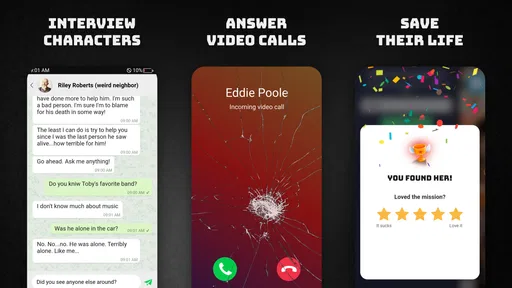
 Analysis by AppCompare
I like mystery games that make me pay attention rather than simply tap through a trail of obvious clues. Peek a Phone takes that idea and turns a phone into the scene of an investigation: you examine information, connect details, and try to work out what happened. The setup is immediately appealing, but the experience works best when you’re in the mood to read carefully and think at your own pace. If you want constant action or a game that explains every step, this may feel more demanding than its simple premise suggests.
Why progress can stall
I’ve found that a stalled case is easier to assess when I first separate a missing connection from an app that has actually stopped responding. In this section, I focus on the kinds of reading and reasoning that can make progress feel slower than expected, and on how to check whether the mystery itself is the obstacle. That distinction is a useful starting point before changing anything on your device.
Reading is part of the investigation
This is an adventure game built around detective work, not a reflex challenge. Its central appeal is the sense that ordinary-looking details can matter. That also creates the most common kind of friction: it can be easy to skim a message or piece of information, assume it is background, and then find yourself unsure how to move forward.
When I hit a dead end in a mystery, I try not to reread everything at random. Instead, I look for details that answer practical questions: who is involved, what changed, and whether two pieces of information conflict. Keeping those questions in mind makes the investigation feel more methodical and helps avoid the impression that progress depends on guessing what the game wants.
A useful habit is to pause after each new clue and summarize it in your own words. Even a short note such as “this person knew about the meeting” can make connections easier to spot later. This is especially helpful if you play in brief sessions, because the story may be less fresh when you return. The game rewards attention, so a distracted five-minute session can be less satisfying than a focused one of the same length.
Don’t confuse a deliberate pause with a broken game
Mystery games can make uncertainty feel like a technical problem. If you have read the available information but cannot see the next lead, first revisit the story rather than repeatedly closing and reopening the app. Look for names, timelines, and statements that do not quite fit together. The point is not to find a hidden button by tapping everywhere; it is to interpret what the investigation has already put in front of you.
That distinction matters for expectations. The main challenge is careful observation, and the game may ask you to sit with incomplete information. Players who enjoy forming and revising theories are likely to find that tension rewarding. Players who prefer a clearly signposted objective at every moment may find the same design opaque.
Worth Reading Before You Choose

EA SPORTS FC Mobile 26 Is a Bigger Football Game, but It Takes Time

Flipboard Shows What News Apps Must Do Beyond the Feed

Switching to Android Auto Means Rethinking Your Driving Routine

Google Calendar Makes a Crowded Week Easier to Manage

Ludo King Makes the Most of the Minutes Between Plans

Baby Panda World Brings Quick Play to Modern Phones, but Its Game Library Feels Busy
Getting ready for a smoother session
A little preparation can make a clue-heavy game feel less demanding, especially if you tend to play in short bursts. I’ll cover a few sensible checks and ways to choose a session that suits your attention, without turning setup into a project. The goal is to arrive ready to follow the investigation rather than spend your limited playtime recovering from distractions.
Make the first session low-pressure
I would start when you can give the story a little attention rather than installing it in the middle of another task and expecting to understand everything in seconds. You do not need a special setup routine; the practical point is simply to avoid splitting your focus. Reading clues while switching constantly between unrelated tasks makes it easier to miss a useful detail, and then the game can seem harder than it is.
If you usually play on a phone during a commute or in short breaks, treat each session as a small investigation rather than a race to finish. Before stopping, remember the last important clue or write down a brief reminder for yourself. On returning, review that point first instead of trying to reconstruct the entire plot from memory. This small workflow is more useful than rushing through new material just to regain momentum.
The game is free to download, with in-app purchases ranging from $0.99 to $49.99 per item. I’d approach those purchases as optional spending and decide whether anything on offer is worthwhile only after you know how much you enjoy the core detective experience. You do not need to spend immediately just to find out whether this style of game suits you.
Check compatibility before troubleshooting
Before blaming a stalled session on a device issue, check that your operating system meets the game’s minimum requirement of version 10. The current version is 84, and the game is developed by FaintLines, Inc. If you are installing it on a device that is close to the minimum requirement, it is sensible to make sure the system is up to date and that the app itself has finished installing before judging how it behaves.
As with any mobile game, a restart is a reasonable basic step if the app stops responding: close it, reopen it, and see whether the same problem happens again. If it does, check that the device has a stable connection where one is needed and that the operating system is compatible. These are general checks, not a guarantee that every issue has the same cause. Avoid deleting the app as a first reaction if you are unsure whether your progress is preserved; losing a place in a mystery is an especially frustrating way to interrupt the experience.
Choose a play style that suits the game
Because the investigation asks for attention, I would not recommend playing while you are too tired to read or while you have only a few seconds to spare. That is not a flaw unique to this game, but it affects how the clues land. A quiet moment, headphones if you prefer them, and enough time to follow a thought to its conclusion can make a noticeable difference to the experience without requiring any elaborate preparation.
It is also worth setting expectations about age and tone. The content rating is Teen, so this is aimed at an older audience than a very young child’s casual puzzle game. If you are choosing something to play with a younger family member, check whether that rating and the mystery themes feel appropriate for them rather than assuming that a phone-based presentation means the content is child-focused.
Recovering your train of thought
When I return to a mystery after a break, I get more from retracing one clear piece of evidence than from scanning everything again. Here I’ll describe a practical way to rebuild context, test a theory against what you actually know, and decide when a pause is more useful than another attempt. That approach can restore momentum without relying on random taps.
Return to evidence, not random tapping
If you lose the thread, work backward from the last thing you understood. Identify the people or events tied to it, then revisit the surrounding clues and ask what each one actually establishes. Separate what you know from what you merely suspect. That simple distinction can prevent a theory from becoming a distraction, particularly when one interesting detail seems to point in several directions.
I also find it useful to compare statements instead of reading each one in isolation. A clue may feel unimportant by itself but become meaningful when set beside another account or event. The practical trade-off is that this kind of play can involve rereading. If you dislike revisiting text, a faster, action-led adventure may be a better fit. If you enjoy the moment when two previously separate details click together, that slower rhythm is part of the appeal.
When progress still feels unclear, take a short break rather than repeating the same actions in frustration. A fresh look can make an overlooked detail stand out. If the app itself is visibly unresponsive, basic closing and reopening may help; if it is working normally but the case remains unclear, the answer is more likely to be in the clues than in a device setting.
Keep sessions manageable
There is no need to finish a long stretch of play in one sitting. For a stop-and-start routine, I’d end a session after a meaningful discovery and leave myself a one-line reminder of the question I was considering. That gives the next session a clear starting point. It also makes the game easier to fit around daily life without turning every pause into a full recap.
This approach is particularly useful if you play while waiting for an appointment or winding down at home. In the first situation, a short session can be enjoyable, but interruptions may break concentration. At home, you may have more room to follow a chain of clues without rushing. Neither is inherently the “right” way to play; the key is matching the session to the kind of attention the game asks for.
When the problem is elsewhere
A confusing clue and a technical interruption call for different responses, so I think it helps to notice what the app is doing before troubleshooting. This section considers ordinary outside factors, such as device conditions or connection stability, while keeping expectations realistic. From there, I’ll weigh who is likely to enjoy this detective-led adventure and who may prefer a more action-focused alternative.
Separate app trouble from a difficult mystery
If the game launches and responds normally but you cannot decide what a clue means, that is probably a puzzle-solving problem rather than a technical failure. Try recapping the evidence, checking your assumptions, and returning later. If the app freezes or repeatedly fails to open, then device compatibility, a temporary connection issue, or a general app problem becomes more plausible. The distinction helps you choose a sensible next step instead of reinstalling or changing settings unnecessarily.
Also consider the conditions around your session. A poor connection can affect many mobile experiences, while a low-battery or overloaded device can make any app feel less reliable. Those are general possibilities, not proof of what is happening in a specific case. Start with the easiest checks and see whether the issue repeats. If the problem persists, use the game’s available support route rather than making assumptions about what caused it.
For players comparing it with other adventure games, the defining difference is its detective-first focus. Many mobile adventures lean on movement, combat, or quick puzzle interactions; this one is better suited to someone who wants to examine information and build an interpretation. If you want a visually busy game with frequent action, a more traditional action adventure will likely serve you better. If you like mysteries but prefer a clear hint at every turn, a more guided puzzle game may be less frustrating.
Who I’d recommend it to
Peek a Phone is a good choice for players who enjoy reading between the lines, remembering small details, and revising a theory when new evidence appears. It can work well as a focused solo game, especially for someone who likes a mystery that invites thought rather than quick reactions. Its 4.8 average rating across around 115,000 ratings, alongside more than five million installs, suggests that the concept has found a sizeable audience, though popularity alone cannot tell you whether its measured pace will suit you personally.
I would skip it if you mainly want something you can play without reading closely, if you dislike revisiting clues, or if your preferred adventure games depend on constant movement and immediate feedback. I would also be cautious about choosing it for a younger player because it is rated Teen. The game’s strength and its limitation are closely connected: attention to detail is what makes the detective premise engaging, but it can also make casual, interrupted play feel slow.
My practical verdict
With a 4.8 average from around 115,000 ratings, Peek a Phone has clearly attracted plenty of mystery fans, but I’d make the decision based on its style rather than the number. It is free to start, belongs to the adventure genre, and asks you to investigate with patience. There are also around 11,000 written reviews, a useful sign that players have spent time forming opinions about it, not merely glanced at the title.
My recommendation is straightforward: try it if you enjoy connecting clues and can give a story your attention, and keep your first sessions unhurried. Be willing to take notes, revisit evidence, and pause when you are stuck. Choose another kind of adventure if you want action, constant direction, or a quick distraction that never asks you to remember what you just read. For the right player, its phone-centered detective premise gives a satisfying reason to slow down and think; for everyone else, that same demand may feel like work rather than play.
Pros
- Short cases make it easy to play in quick sessions.
- The phone-based format adds variety to familiar puzzle mechanics.
- Clues encourage close reading and attention to detail.
- A good fit for players who enjoy mystery stories and deduction.
- New cases can provide fresh challenges beyond the opening puzzles.
Cons
- Some clues may require trial and error rather than clear deduction.
- Progress can feel slow if you get stuck on a difficult case.
- The game may include ads or optional purchases.
- Reading-heavy puzzles may not suit players looking for action.
- Later cases may repeat similar phone-searching tasks.
FAQs for Peek a Phone - Detective Game
What is Peek a Phone - Detective Game?
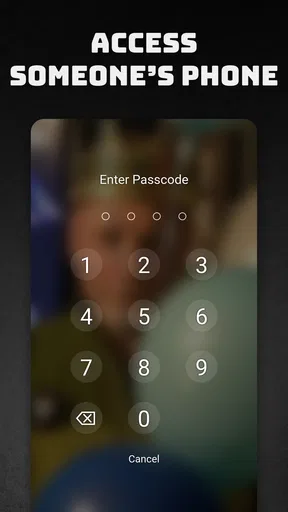
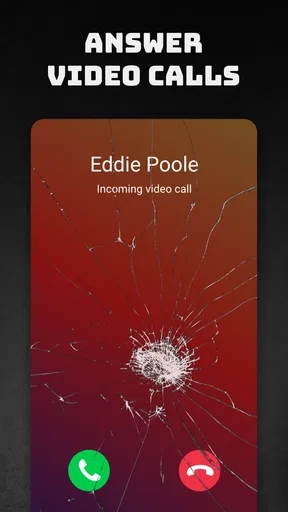
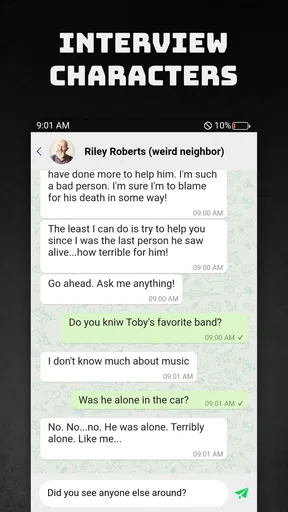
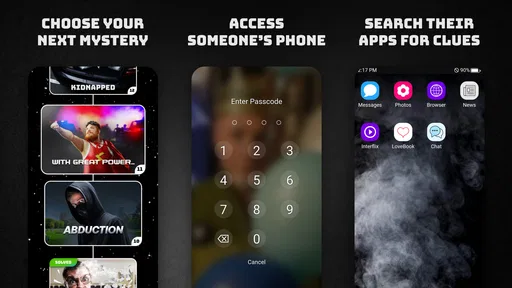
Peek a Phone is a mystery and puzzle game built around investigating the contents of a fictional character’s smartphone. You examine messages, photos, contacts, social media activity, and other digital clues to piece together what happened. Rather than relying on fast reflexes, the game asks you to pay attention, connect details, and use the information on the device to progress through its story.
How do you play Peek a Phone?
Each case gives you access to a simulated phone containing clues relevant to the investigation. You can explore its apps and conversations, inspect media, and compare details you find in different places. Progress usually depends on spotting connections or answering questions based on the evidence. Read carefully: a small clue in a message or image may explain another part of the case, so browsing randomly can make the investigation harder.
Is Peek a Phone suitable for children?
The game is presented as a detective experience, but its cases may include themes such as crime, deception, relationships, or other mature situations. Suitability depends on the specific case and the player’s age and sensitivity. Parents should check the game’s current store listing and available content information before downloading it for a child. It is also worth remembering that the story is fictional, despite its realistic phone-style presentation.
Is Peek a Phone free to download, and does it include ads or in-app purchases?
Availability, pricing, advertisements, and optional purchases can vary by platform, region, and version. Check the Google Play or Apple App Store listing before installing to see the current price and any disclosed in-app purchases or advertising. Some games make an initial case available at no charge while offering additional content separately, so review the listing and purchase details rather than assuming every investigation is included.
Does Peek a Phone need an internet connection, and what permissions should I expect?
The game is designed around examining fictional information inside its simulated phone; it does not require you to provide access to your personal text messages or contacts to solve the story. However, an internet connection may be needed for downloads, updates, ads, or optional purchases, depending on the version. Review the permissions shown by your device and the app’s store privacy information before installation, especially if privacy is a concern.


